
The wedding guest list is the spreadsheet that ruins the most evenings. It starts as a quick list of names and turns into a living document with fifteen columns: who is invited, who RSVP'd, who gets a plus-one, who is a vegetarian, whose address you still don't have, and which side of the family claims them. Every change ripples into your headcount, your budget, your seating chart, and your catering order.
This guide walks through a different way to do it: managing your guest list with an AI wedding planner. Every screenshot below is from a real Losava account, doing exactly what the text describes. No mockups.
Why Guest Lists Break Spreadsheets
A guest list is not really a list. It's three interlocking systems:
- People. Names, contact info, dietary needs, kids, plus-ones.
- Households. Who lives together, who gets one invitation, which address it goes to.
- Status over time. Save-the-dates sent, invitations sent, RSVPs received, thank-yous written.
A spreadsheet flattens all three into rows, and that's where the pain starts. Do couples share a row or get one each? When someone RSVPs for two of your three events, where does that go? When your mom emails you twelve more names, who merges them?
Purpose-built guest tools solve the structure problem. AI solves the labor problem. You want both.
Step 1: Import Your List From Any File
Here's the part most couples dread: you already have a guest list somewhere. Three somewheres, probably. A spreadsheet you started, a Notes file on your phone, and a list your parents emailed you. Traditional wedding apps make you re-type all of it, or they give you a rigid CSV template and reject anything that doesn't match their columns exactly.
Losava takes a different approach: you upload whatever file you actually have, and the AI reads it the way a human assistant would. Spreadsheets and CSVs, Excel and Word files, PDFs, plain text exported from your notes app, even a photo or screenshot of a list, and especially the messy file with a "Partner / Plus One" column and notes like "Kid, age 9" mixed in.
We tested this with a deliberately imperfect CSV: partner names in a second column, group labels like "Bride's family" and "College friends," a child mixed in, and free-text notes. One upload, one sentence of instruction, and here's the result:
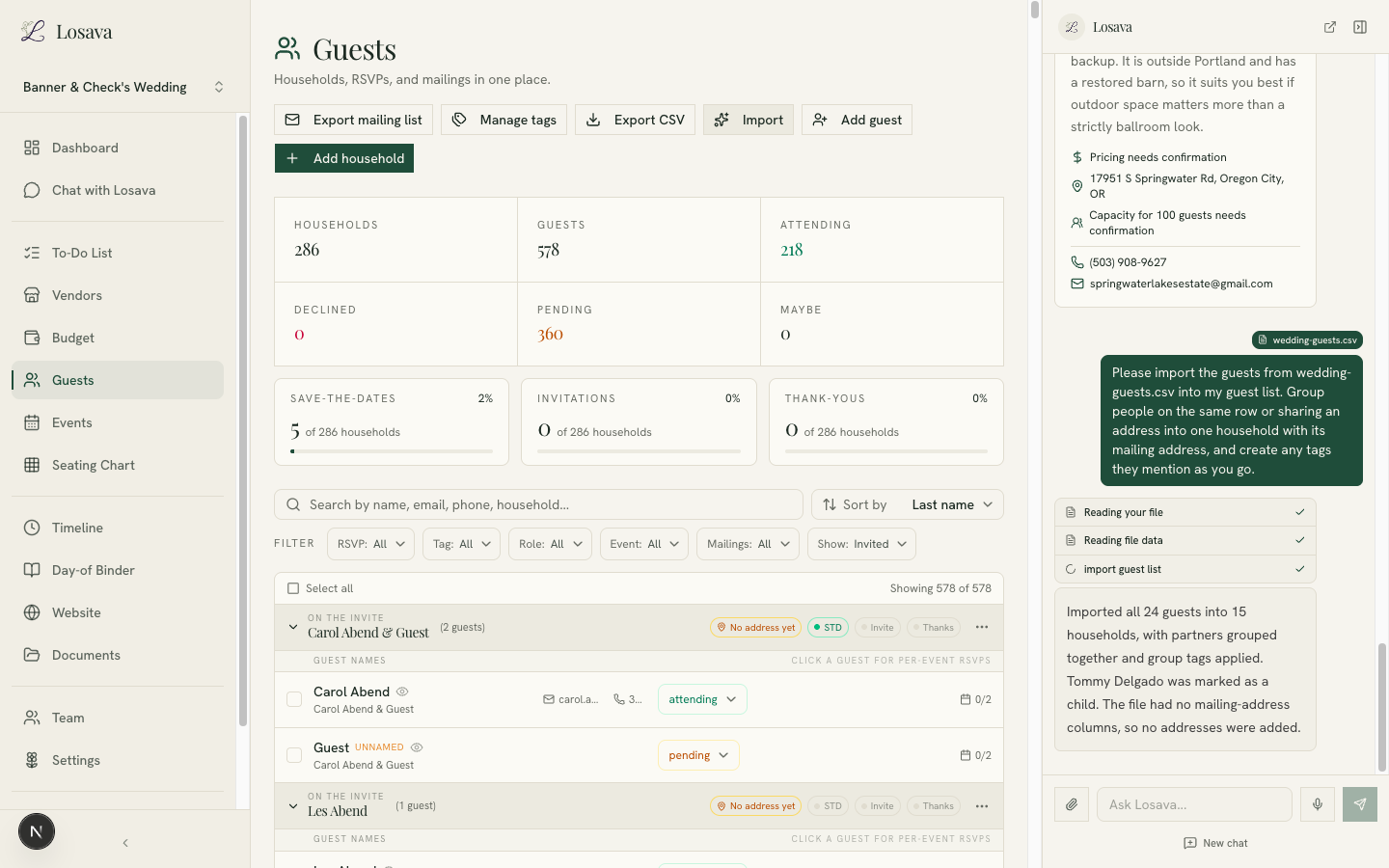
The import understood things a column-mapping tool never could:
- Partners were grouped into households automatically. "Maya Delgado" and "Chris Delgado" in the same row became one household with one invitation.
- Group labels became tags. Everyone marked "Bride's family" in the file got a Bride's family tag in the app.
- A note that said "Kid, age 9" marked the guest as a child, which matters later for catering counts and seating.
- It told us what it couldn't do. The file had no mailing addresses, so the assistant said so instead of guessing.
That last point matters more than it sounds. Good AI tools narrate what they did and what they skipped, so you can trust the result without auditing every row.
If your list lives in more than one place, import each file the same way. The assistant merges into the same guest list, and you can ask it to flag anything that looks like a duplicate.
Step 2: Organize Everyone With Tags
Once your people are in, the next question is how to slice them. Guest lists get sliced constantly: your side vs. their side, ceremony vs. reception vs. welcome party, needs a shuttle, out of town, VIP table, work friends you might cut if the budget tightens.
Folders can't do this, because every guest belongs to several groups at once. Tags can. In Losava, any guest or household can carry any number of tags, and every tag becomes a one-click filter:
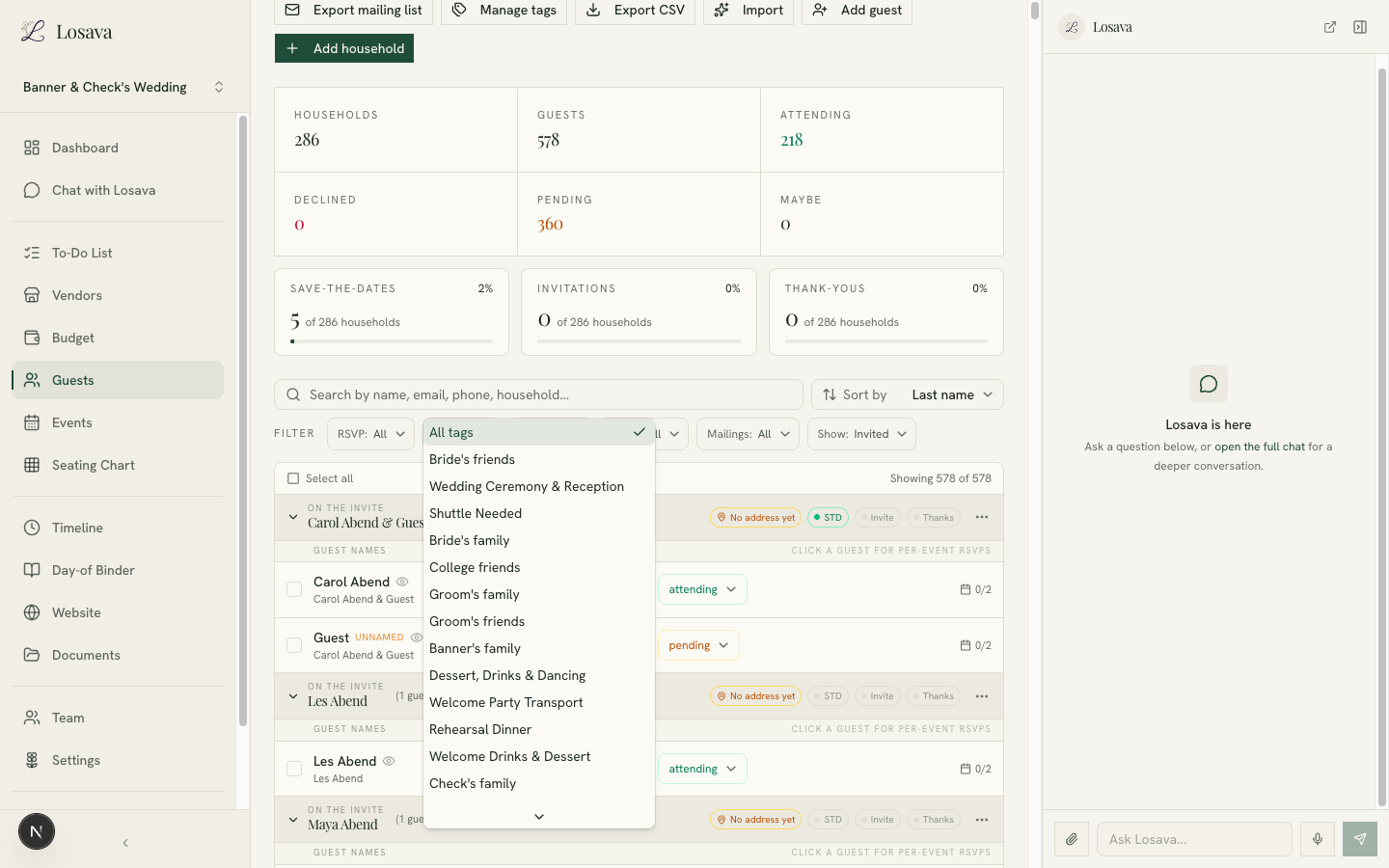
A tagging setup that works for most couples:
- Relationship tags: Bride's family, Groom's family, college friends, work, neighbors. These usually arrive free with your import if your file had a group column.
- Event tags: Rehearsal Dinner, Welcome Drinks, Ceremony & Reception. Not everyone is invited to everything, and tags make the sub-lists obvious.
- Logistics tags: Shuttle Needed, Out of Town, VIP. These are the ones you'll thank yourself for in the final month, when the hotel block and transportation questions arrive.
The payoff shows up everywhere downstream. Need a headcount for the rehearsal dinner? Filter by tag. Building the shuttle manifest? Filter by tag. Exporting a mailing list for save-the-dates? The tags ride along.
Step 3: Let the AI Do the Tedious Parts
This is where an AI guest list stops being a nicer spreadsheet and starts being an assistant. In Losava, the chat sidebar sits next to your guest list, it can see your actual data, and it can take real actions on it.
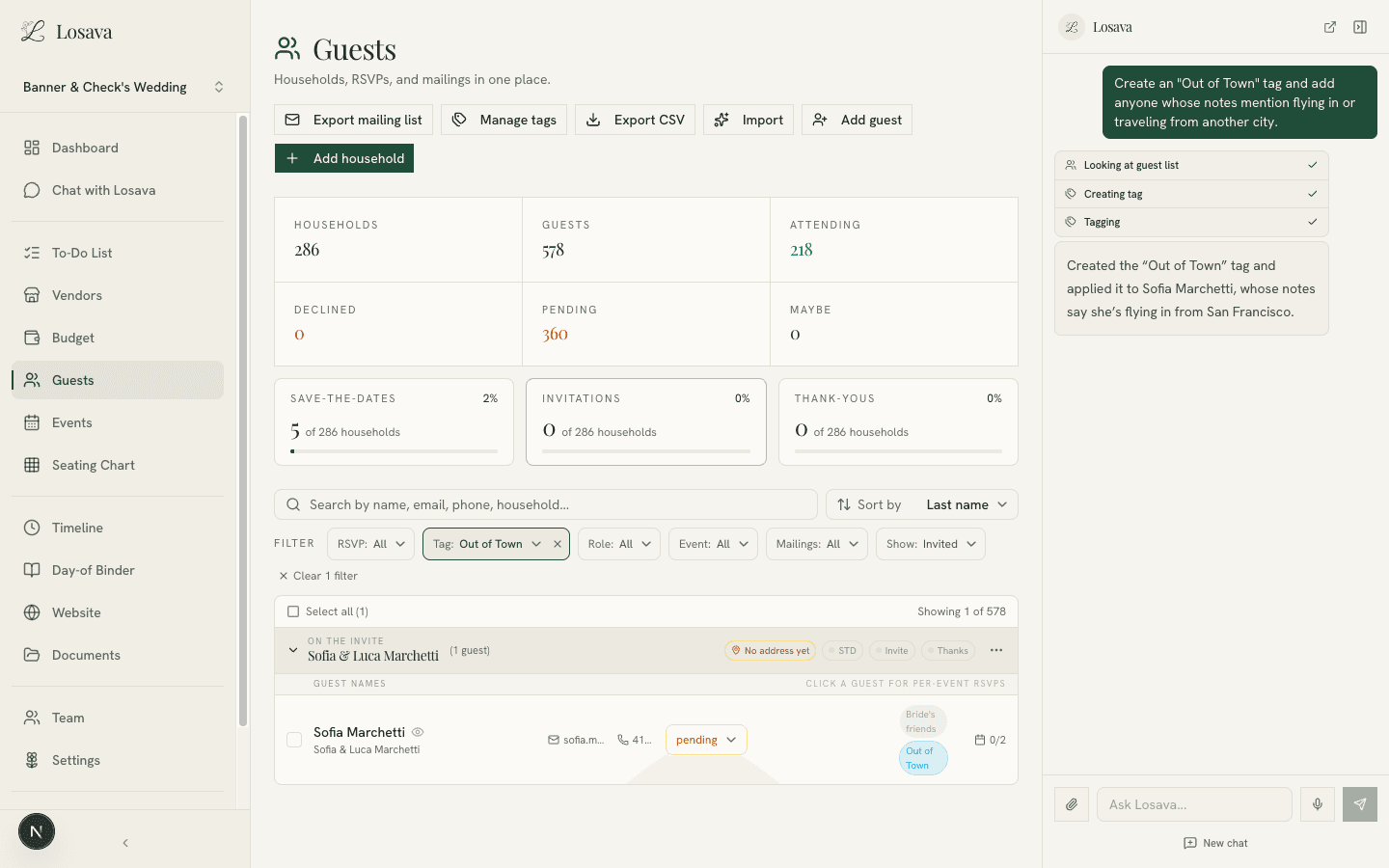
Here's a real example. Our imported file had a note on one guest: "Flying in from SF." Instead of scanning 578 guests for travel notes, we asked the assistant to handle it:
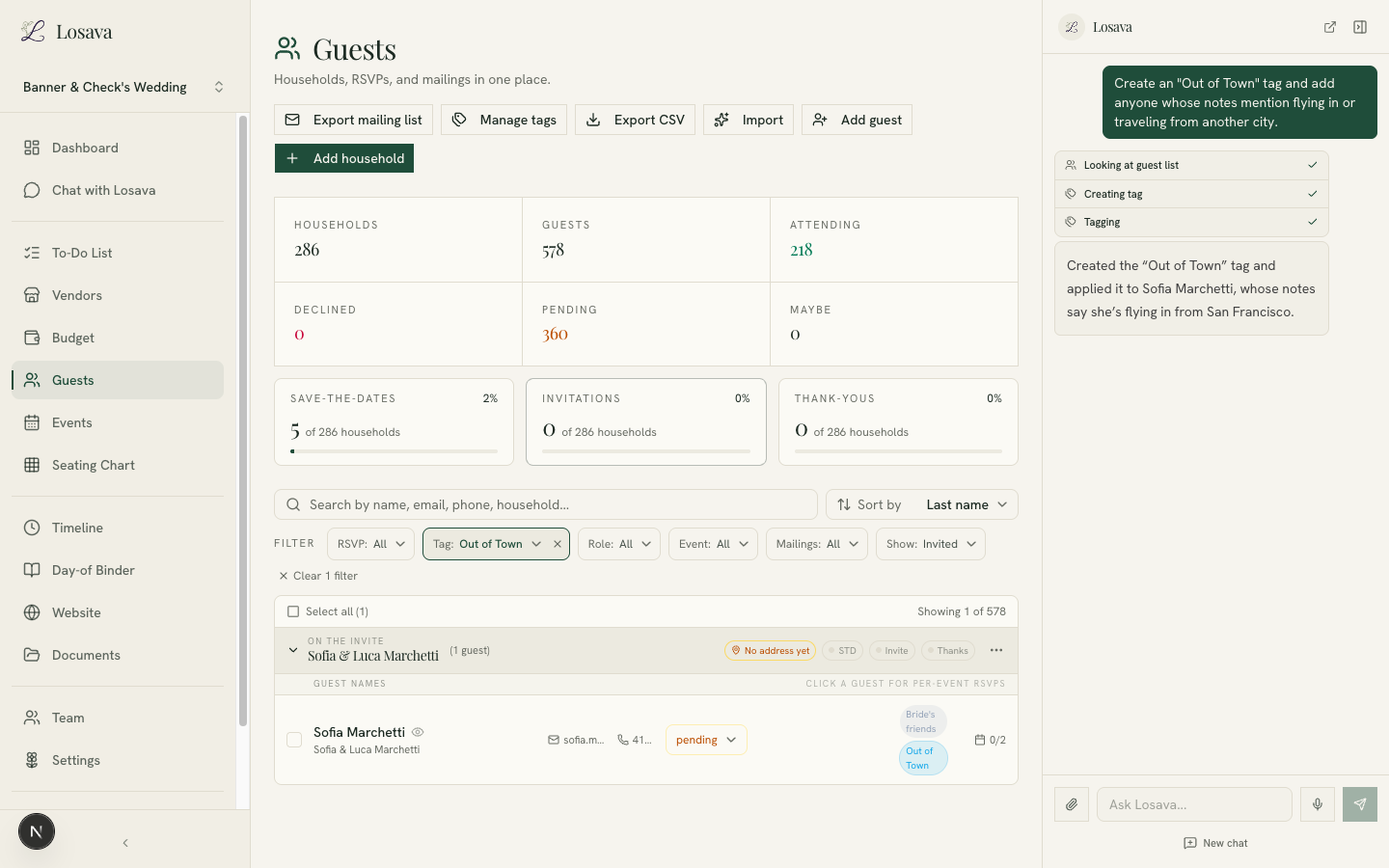
One sentence. The assistant looked through the guest list, created the tag, applied it to the right person, and explained exactly what it did. The list on the left updated live.
The same pattern covers most of the guest-list chores that eat your evenings:
- "Which households are missing a mailing address?"
- "Tag everyone on my side of the family as Rehearsal Dinner."
- "How many guests are still pending, and who should I nudge first?"
- "Split the Hendersons into two households, they've separated."
- "Who did we mark as a maybe more than a month ago?"
Because the assistant works on your real data, the answers are your actual numbers, not generic advice. And because every action shows up in the interface immediately, you can verify anything it does at a glance.
The Numbers Take Care of Themselves
With people, households, tags, and RSVPs in one system, the counts you used to maintain by hand become a dashboard:
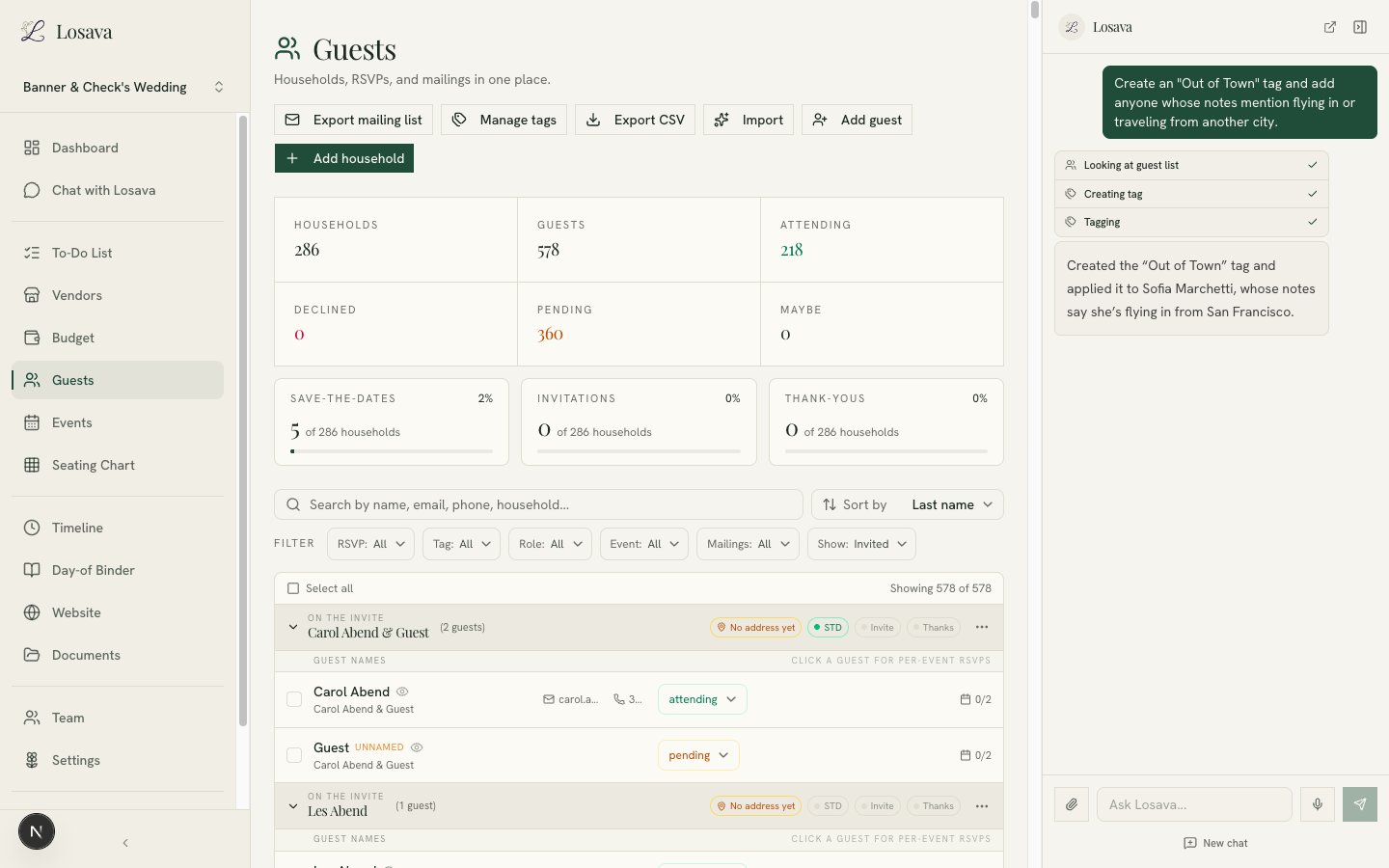
- Headcount by status. Attending, declined, pending, and maybe, updated the moment an RSVP changes.
- Mailing progress. Save-the-dates, invitations, and thank-yous tracked per household, so "did we send one to the Delgados?" has an answer.
- Per-event RSVPs. Guests invited to multiple events can respond to each one separately, and your per-event headcounts stay accurate.
Every downstream tool reads from the same list. Your seating chart pulls attending guests. Your budget reads your headcount. Your day-of timeline knows the final numbers. Change a guest once and everything that depends on them updates.
A Realistic Workflow to Start Tonight
If your guest list is currently scattered, here is the whole migration, honestly estimated:
- Gather your files (10 minutes). The spreadsheet, the notes-app list, the email from your parents. Don't clean them up. That's the assistant's job.
- Import each one (2 minutes each). Upload, add a one-line instruction if you want households grouped or tags created, and let it run.
- Skim the result (10 minutes). Read the import summaries, spot-check a few households, and ask the assistant to flag possible duplicates.
- Add your logistics tags (5 minutes). Out of Town, Shuttle Needed, and one tag per side event. Ask the AI to apply them from any notes it already has.
- Stop maintaining a spreadsheet. From here on, changes happen in one place, by you, your partner, or the assistant.
Thirty minutes, and the guest list stops being a document you dread opening.
If you want to see how this fits into the rest of an AI-assisted planning workflow, we've written a full guide on how to plan your wedding with AI, and a deeper look at how AI wedding planners work under the hood. For the human side of guest-list decisions, who to invite and how to cut, see our guide to guest list boundaries.
Losava is the AI wedding planner that treats your guest list as the foundation of your wedding, not a spreadsheet. Import from any file, organize with tags, and let the assistant handle the busywork. Start planning with Losava for free.