
Wedding budgets rarely fail in one dramatic moment. They fail quietly, a few hundred dollars at a time: a deposit that never got written down, a category estimated twice, a "we'll figure it out later" that compounds for months. By the time most couples notice, they're thousands over and can't say exactly where it went.
This guide walks through managing a wedding budget with an AI assistant that can see, and edit, your actual numbers. Like our guest list walkthrough, every screenshot is from a real Losava account doing exactly what the text describes. Including the part where the budget starts $8,850 over.
Why Wedding Budgets Drift
Three patterns cause most of the damage:
- Unlogged spending. Deposits and partial payments happen over months, across two people. If logging a payment takes more than a few seconds, it doesn't happen, and your "paid so far" number quietly stops being true.
- Double counting. You set an estimate for a category, then book a real vendor, and now the category holds both the guess and the reality. Your projected total inflates and you start cutting things you didn't need to cut.
- No connection between decisions and dollars. Your guest count changes your catering cost. Your venue changes your rental needs. In a spreadsheet, nothing recalculates unless you remember to do it.
A budget tool fixes the arithmetic. An AI assistant attached to the budget fixes the workflow, because you can hand it the messy, human version of what happened and it does the bookkeeping.
Start With a Budget, Not a Blank Grid
When you set up Losava, you give it a total and it builds a starting allocation across categories: venue, catering, photography, flowers, music, attire, stationery, transportation, favors, and a miscellaneous buffer. Each line is marked as Losava's estimate until you replace it with a real number, so you always know which figures are guesses and which are contracts.
The dashboard also compares your allocation against industry guidelines, so you can see at a glance whether your venue share or photography share is unusual. That context matters when you start cutting: trimming a category that's already lean feels productive but saves very little.
Log Spending in Plain English
Here's the habit that keeps a budget honest, and it takes one sentence. We booked a photographer in our test account and told the assistant what happened, the way you'd tell a friend:
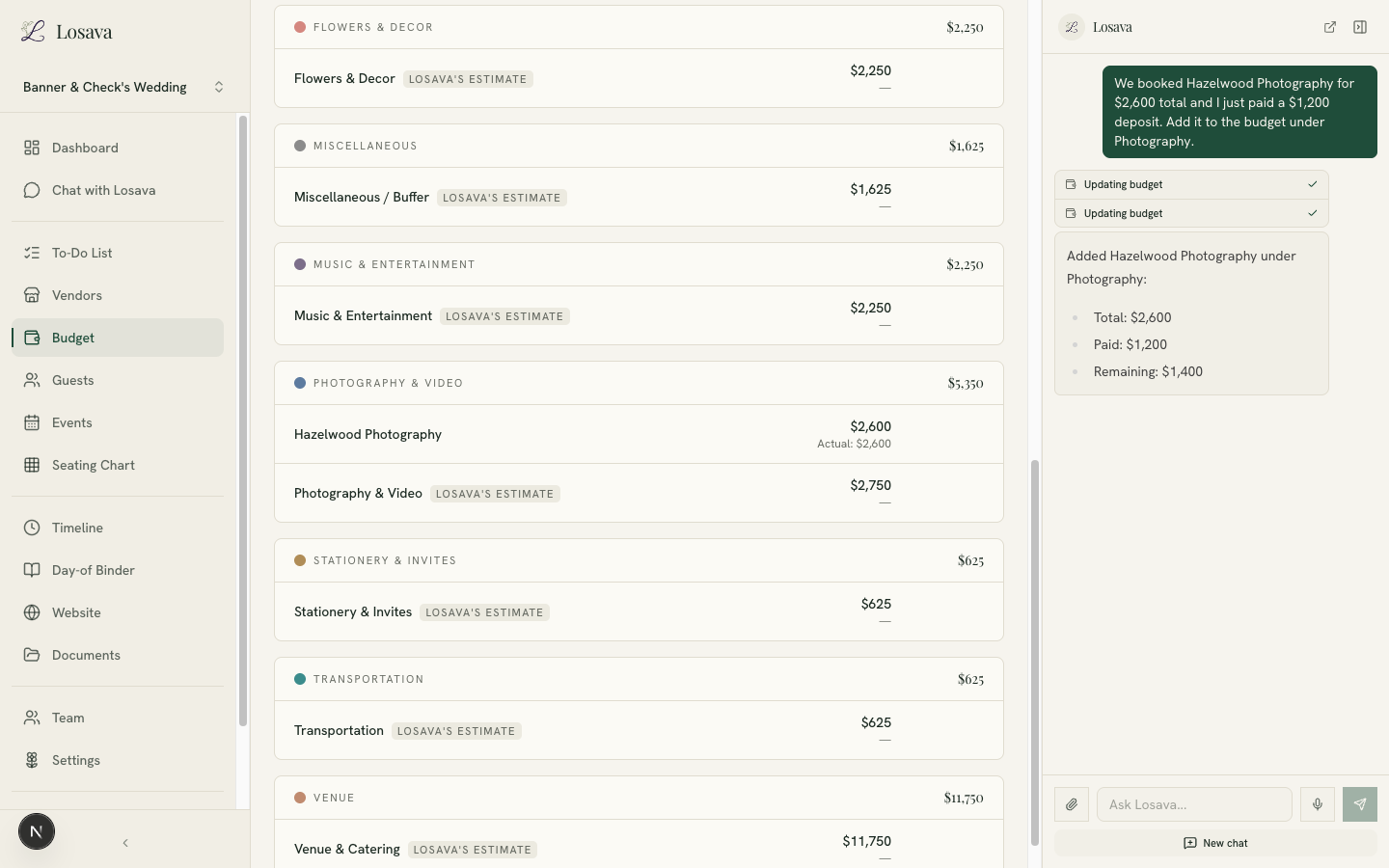
One message: "We booked Hazelwood Photography for $2,600 total and I just paid a $1,200 deposit." The assistant created the line item under Photography & Video with the contracted total, recorded the $1,200 as paid, and calculated the $1,400 still owed. The category list on the left updated immediately.
That "still owed" number is the one spreadsheets lose track of first. Weddings are paid in deposits and balances, and knowing your remaining obligations is the difference between a budget and a guess.
The same conversational pattern covers the rest of the bookkeeping:
- "I paid the final $1,400 to Hazelwood today."
- "The florist quote came in at $1,150, put it in as an estimate."
- "Hazelwood covers video too, so remove the generic Photography & Video estimate."
That last one matters. When a real vendor replaces a placeholder estimate, you tell the assistant and the placeholder disappears, which prevents the double-counting problem entirely. Almost entirely. Keep reading.
Ask the Hard Question: "Where Can We Cut?"
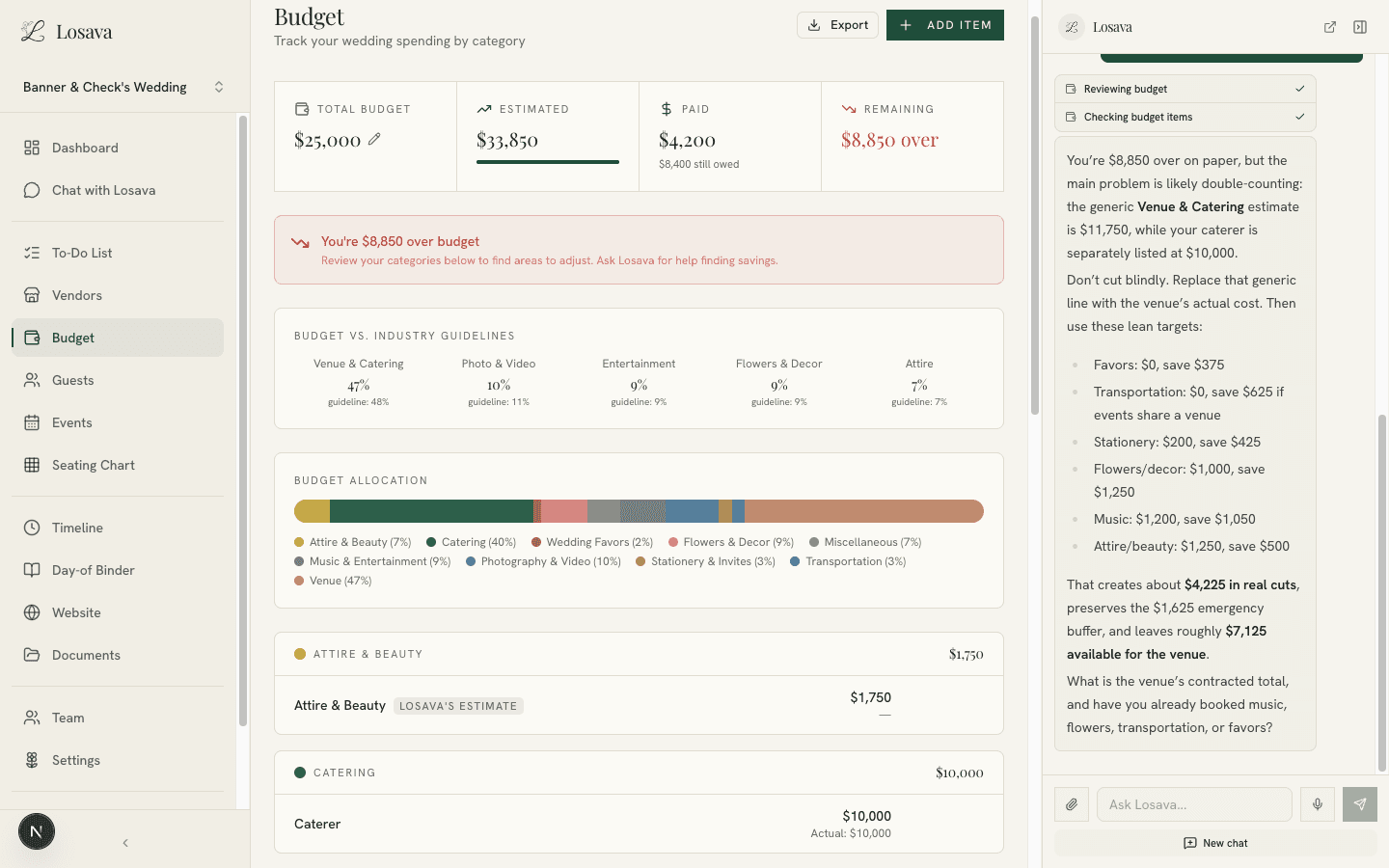
Our test account's budget was in genuinely bad shape: $25,000 total, roughly $33,850 projected. So we asked the question every couple eventually asks, with one constraint:
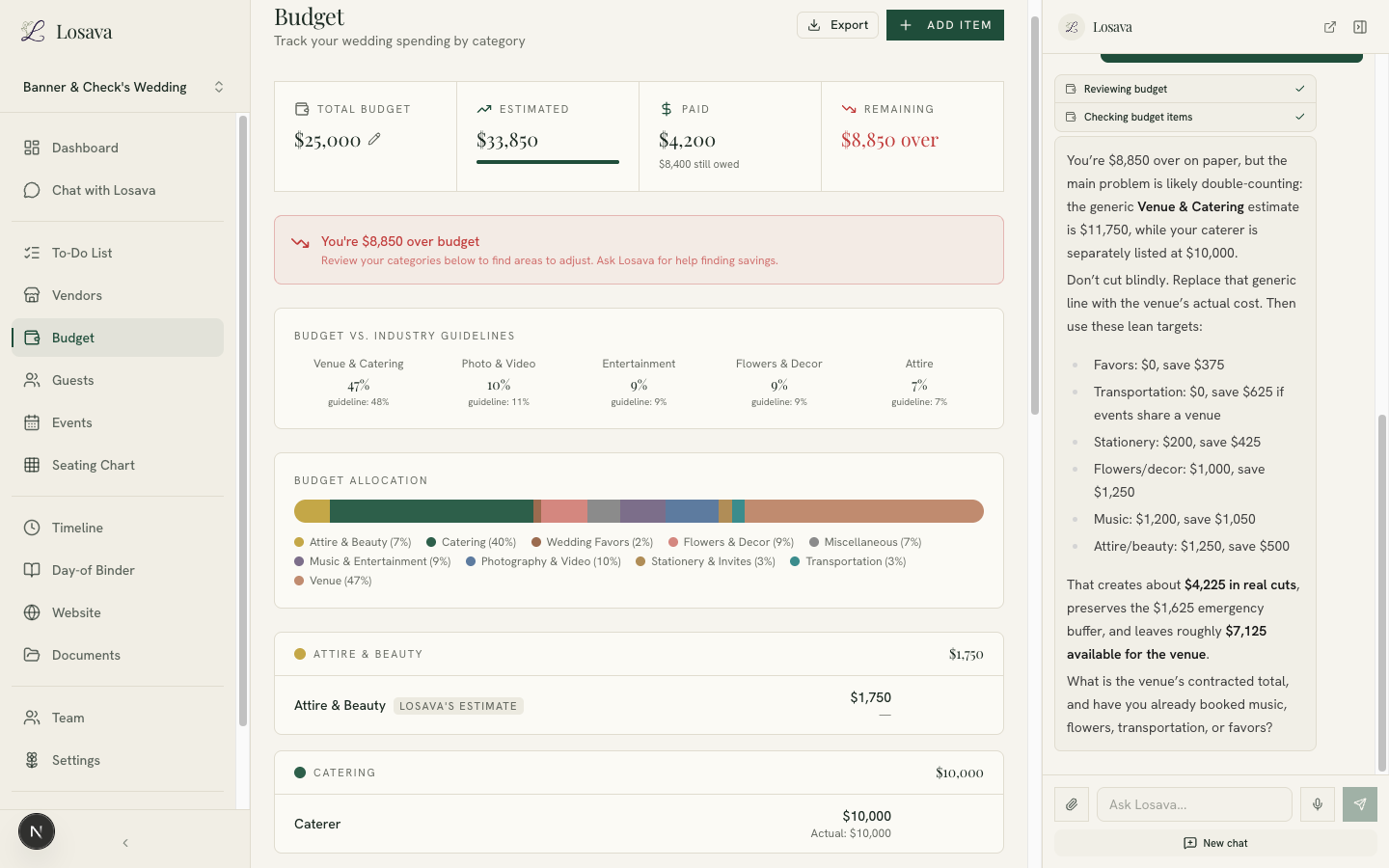
The response is worth reading closely, because it did three things a generic AI chatbot can't:
- It audited before it advised. The first thing it flagged was that the budget was over "on paper" partly because of double counting: a generic Venue & Catering estimate of $11,750 sitting alongside a separately listed $10,000 caterer. It told us to replace the estimate with the venue's contracted cost before cutting anything real.
- It gave numbers, not vibes. Favors to zero saves $375. Transportation to zero if the events share a venue, $625. Stationery to $200, flowers to $1,000, music to $1,200, attire to $1,250. About $4,225 in identified cuts, with the $1,625 emergency buffer deliberately preserved.
- It respected the constraint. We said don't touch photography, and photography wasn't touched.
This is what "AI budget tracking" actually means in practice. Not a chatbot reciting the average cost of a DJ in America, but an assistant reading your real line items, catching your real bookkeeping mistake, and doing arithmetic on your real numbers.
Let It Apply the Plan
Advice you have to implement by hand across ten line items usually doesn't get implemented. So we gave the assistant the venue's real contracted price and told it to apply its own recommendations:
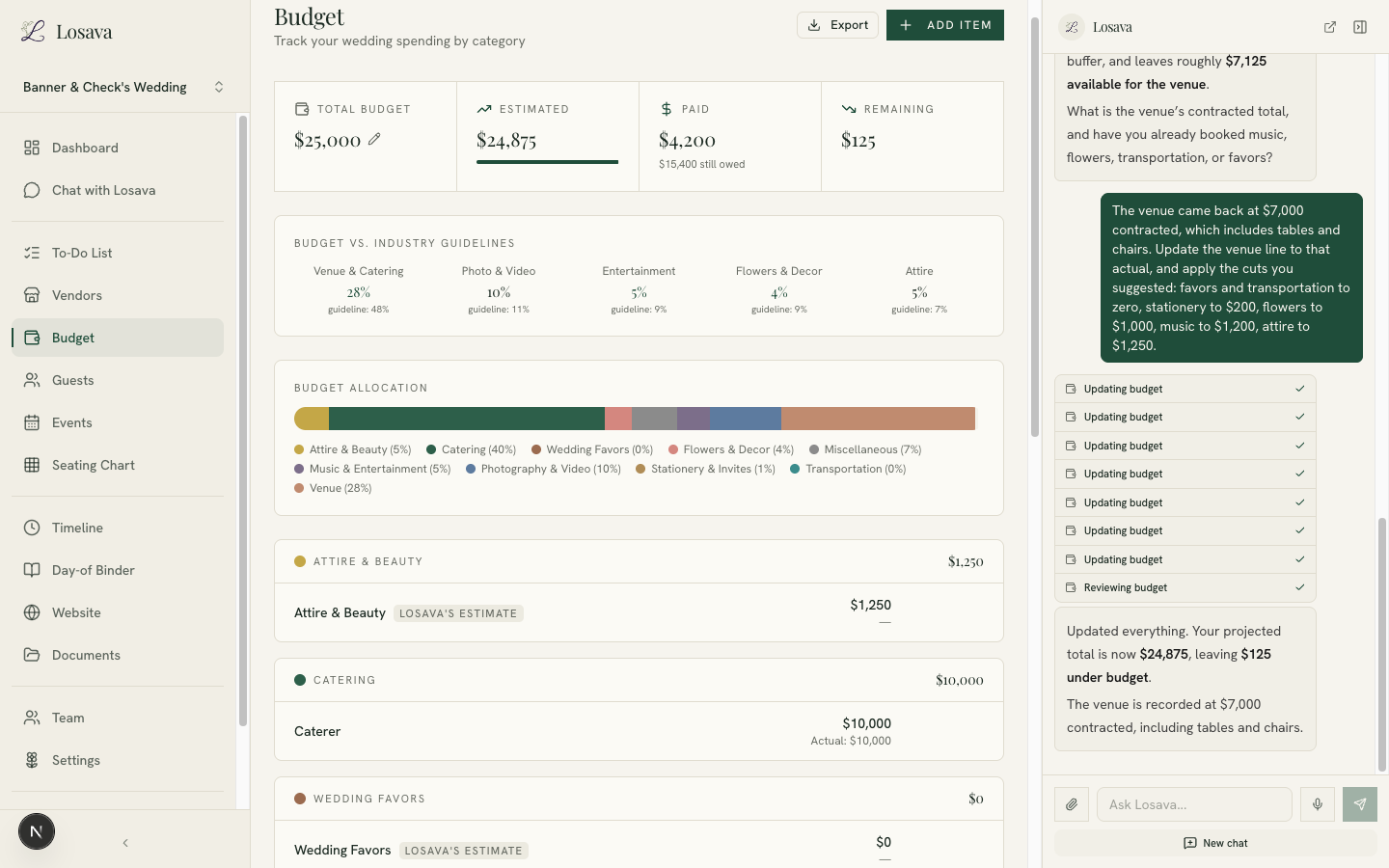
Seven line items updated in one pass, each visible as a step you can audit in the sidebar. The projected total landed at $24,875, $125 under the $25,000 ceiling, and the over-budget warning that had been sitting at the top of the page since the start of this walkthrough disappeared.
From $8,850 over to $125 under, in four chat messages, without touching photography. The couple's actual job in that exchange was the human part: getting the real venue quote and deciding which cuts they could live with.
The Numbers Stay Connected
The budget doesn't live alone. Because Losava keeps your guests, vendors, and events in the same system:
- Your headcount informs catering. When RSVPs change your attending count, your per-head costs are recalculated against real numbers, not the guess you made eight months earlier.
- Booked vendors flow into the budget. When a vendor moves from "researching" to "booked," the contracted amount becomes a budget line, not a sticky note.
- Paid vs. owed is always current. The dashboard splits what you've spent from what you still owe, so the "can we actually afford this upgrade?" conversation uses tonight's numbers.
And because the assistant can see all of it, the questions you'd normally build a pivot table for are just questions: "How much have we paid so far this month?" "What's left to pay before the wedding?" "If ten more guests say yes, what happens to catering?"
A Weekly Routine That Takes Five Minutes
The couples who stay on budget aren't the ones with the fanciest spreadsheet. They're the ones whose numbers stay true. With an AI budget, the routine is short enough to actually survive wedding-planning fatigue:
- Tell the assistant what happened this week. Deposits paid, quotes received, decisions made. One sentence each.
- Glance at the dashboard. Total, paid, still owed, remaining. If the warning banner is up, don't let it sit.
- Ask one question. "Anything look off?" is a fine question. So is "what's due in the next 30 days?"
For how budgeting fits into the rest of an AI-assisted planning workflow, see our step-by-step guide to planning with AI. If you're still deciding how much wedding you can afford in the first place, start with our realistic budget breakdown guide.
Losava is the AI wedding planner that keeps your budget honest: log spending in plain English, track paid versus owed, and get cut recommendations based on your real numbers. Start planning with Losava for free.