
Ask newlyweds which planning task they'd least like to repeat and the seating chart wins almost every time. It's a constraint-satisfaction puzzle wearing a craft project's clothing: hundreds of people, dozens of tables, family politics, couples who must sit together, exes who must not, and a deadline that lands in the most stressful week of the entire engagement.
This is the third post in our series of real product walkthroughs, after the guest list and the budget. Same rules as always: every screenshot below is from a real Losava account, and the AI runs you'll see actually happened, including the part where 24 guests were still unseated.
Why Seating Charts Hurt
Three reasons, and only one of them is about the chart itself.
- It's a genuinely hard puzzle. Seating 150 guests at 15 tables with even five or six constraints creates more combinations than any human wants to think about. Move one person and three other tables need adjusting.
- It depends on everything else. You can't finalize seats until RSVPs are in, and RSVPs trickle. Every late "yes," every "actually, plus one," every declined invitation reopens the puzzle.
- The data lives somewhere else. Most couples build the chart in one tool (a whiteboard, a website, a PDF from the venue) while the guest list lives in another. Every change has to be carried between them by hand.
The fix for the third problem is structural: build the chart where your guest list already lives. The fix for the first two is an assistant that can re-solve the puzzle on demand.
Start With Your Real Floor Plan
A seating chart is only useful if it matches the physical room. In Losava you set your actual floor dimensions (our test venue floor is 60 by 40 feet) and lay out real table sizes: 48 inch rounds that seat 6, 60 inch rounds that seat 8 to 10, banquet tables, a sweetheart table for the couple. You can drop in venue elements too, so the dance floor, bar, and DJ booth occupy the space they'll occupy on the night.
Our test account is a big wedding: 578 guests across 57 tables. But notice the panel on the right:
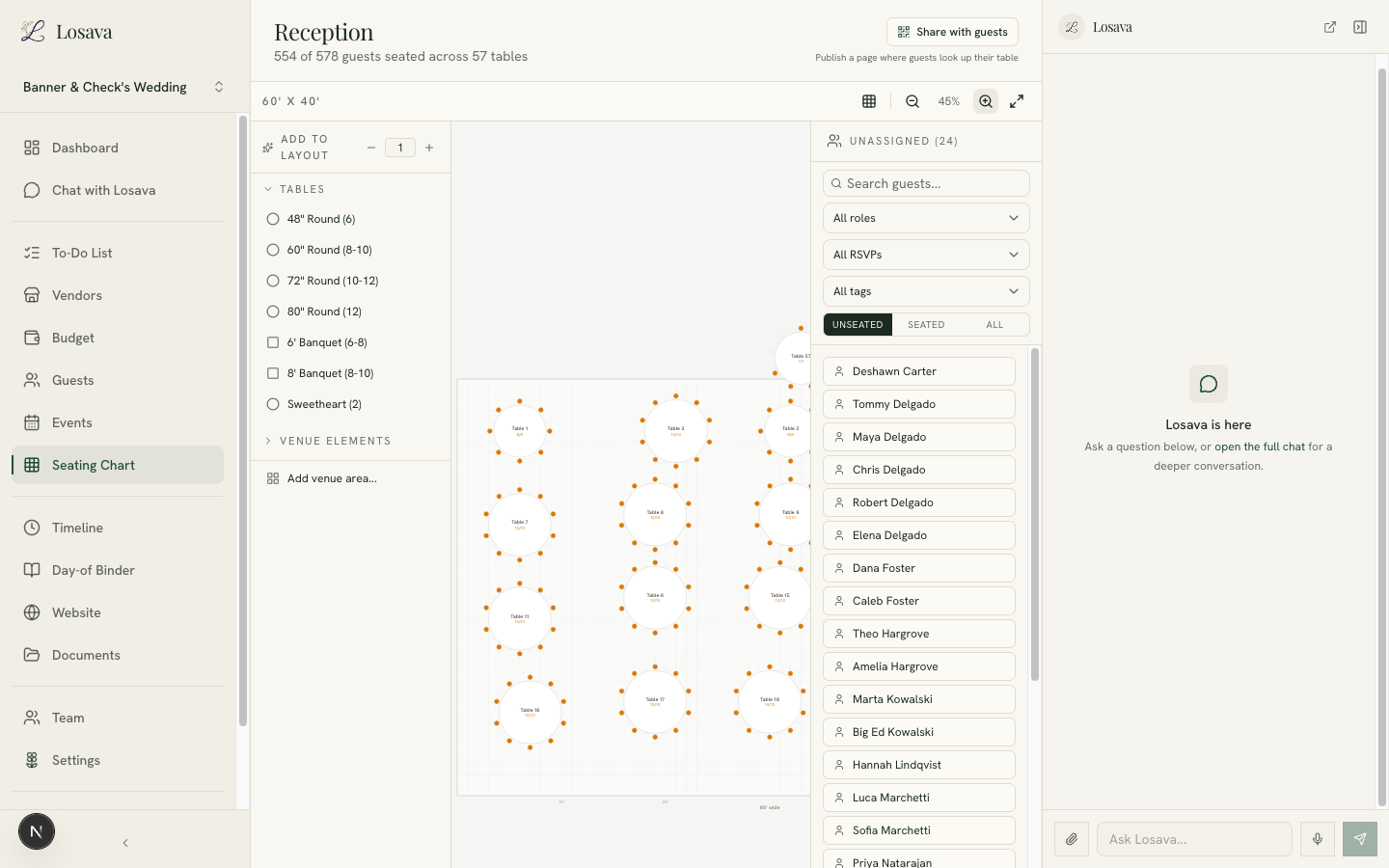
Twenty-four guests, unassigned. These are the guests we imported from a CSV in the guest list walkthrough. This is the state most couples live in for months: the chart is mostly done, but every guest-list change leaves stragglers, and re-opening the puzzle by hand is miserable enough that people procrastinate it.
The unassigned panel filters by role, RSVP status, and tag, so even doing it manually beats a spreadsheet. But we didn't do it manually.
Hand the AI Your Constraints, Not Your Evening
Here's the entire instruction we gave the assistant, exactly as typed:
"Seat the 24 unassigned guests. Keep households together, don't split couples, and try to seat them near people they share a tag with. Add tables if you need to."
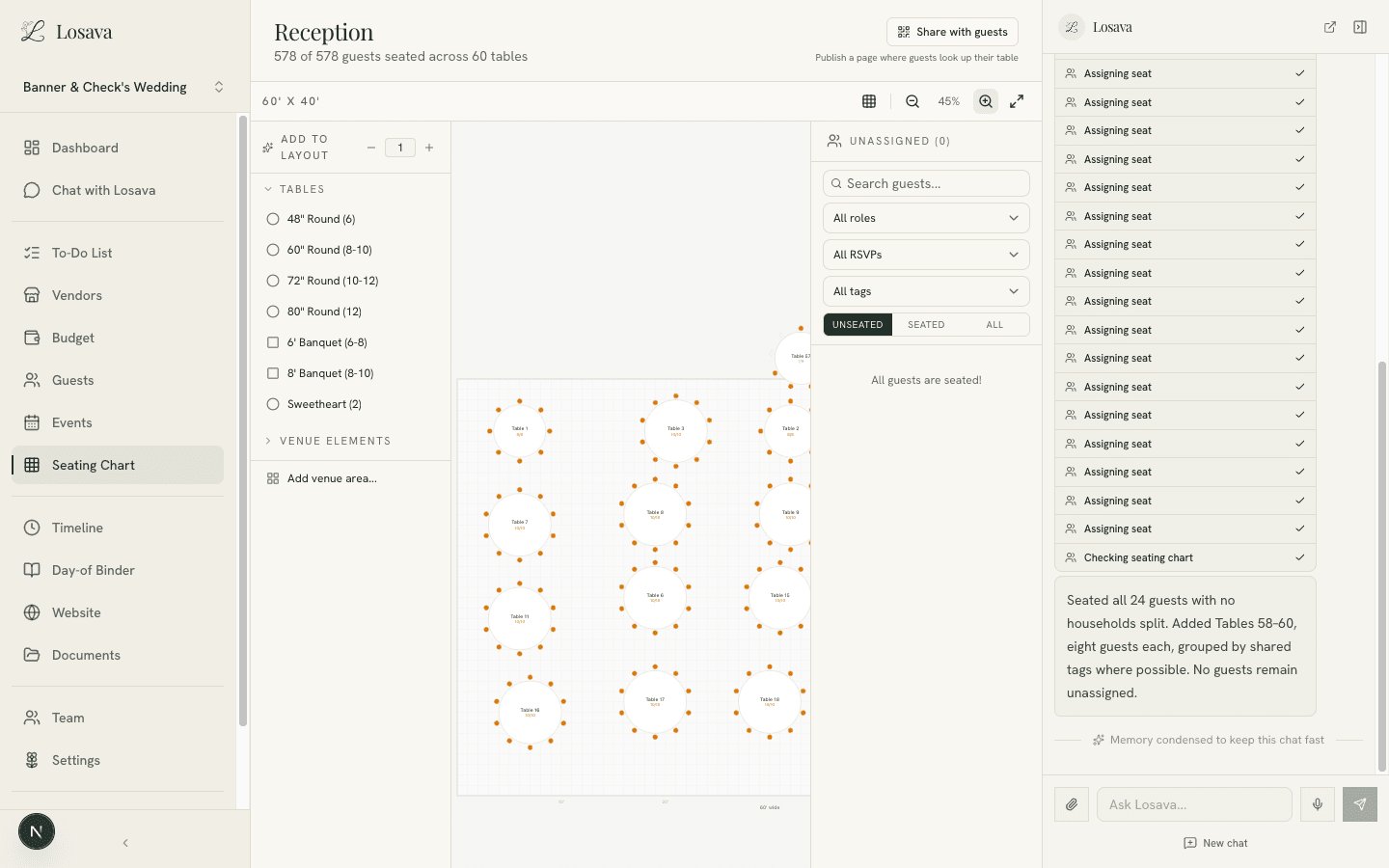
That's the whole job description. Households intact, couples together, social affinity where possible, and permission to extend the layout. The assistant checked the chart, browsed the guest list, realized the existing 57 tables were essentially full, and got to work:
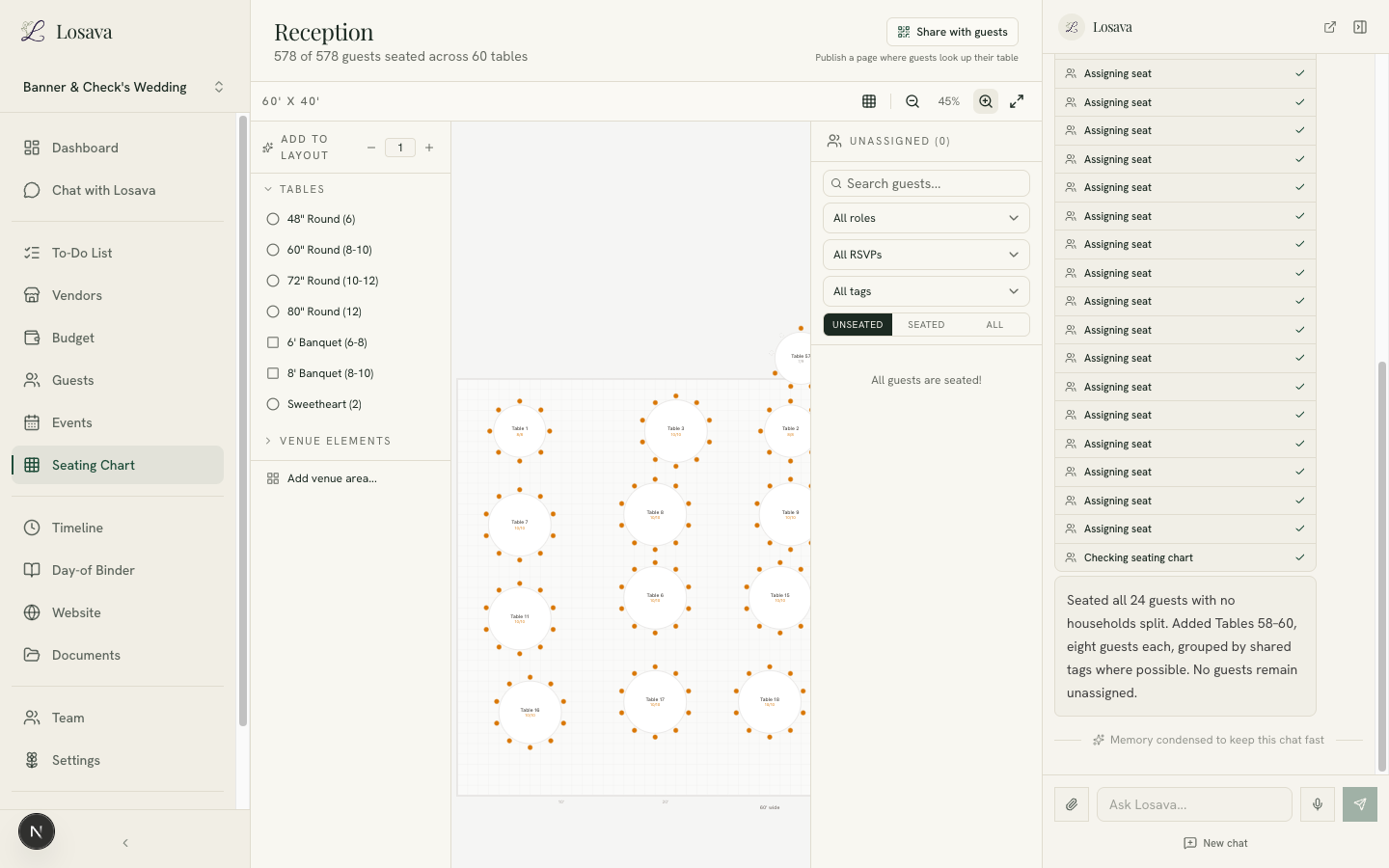
Every step is visible in the sidebar: three tables added, then seat assignments one by one, each auditable. The summary reports the result in plain language: all 24 guests seated, no households split, three new eight-person tables, guests grouped by shared tags where possible. The header now reads 578 of 578 guests seated across 60 tables, and the unassigned panel is empty.
The whole run took about five minutes, unattended. The equivalent manual session is an evening, and the couples who've done it know which evening: the one two weeks before the wedding.
Trust, but Verify
An AI that moves 24 people around your reception should show its work, and this is where having the chart and the guest list in one system pays off. We searched the seated list for the family from our import, the Delgados, five people across three households in the file, including a nine-year-old:
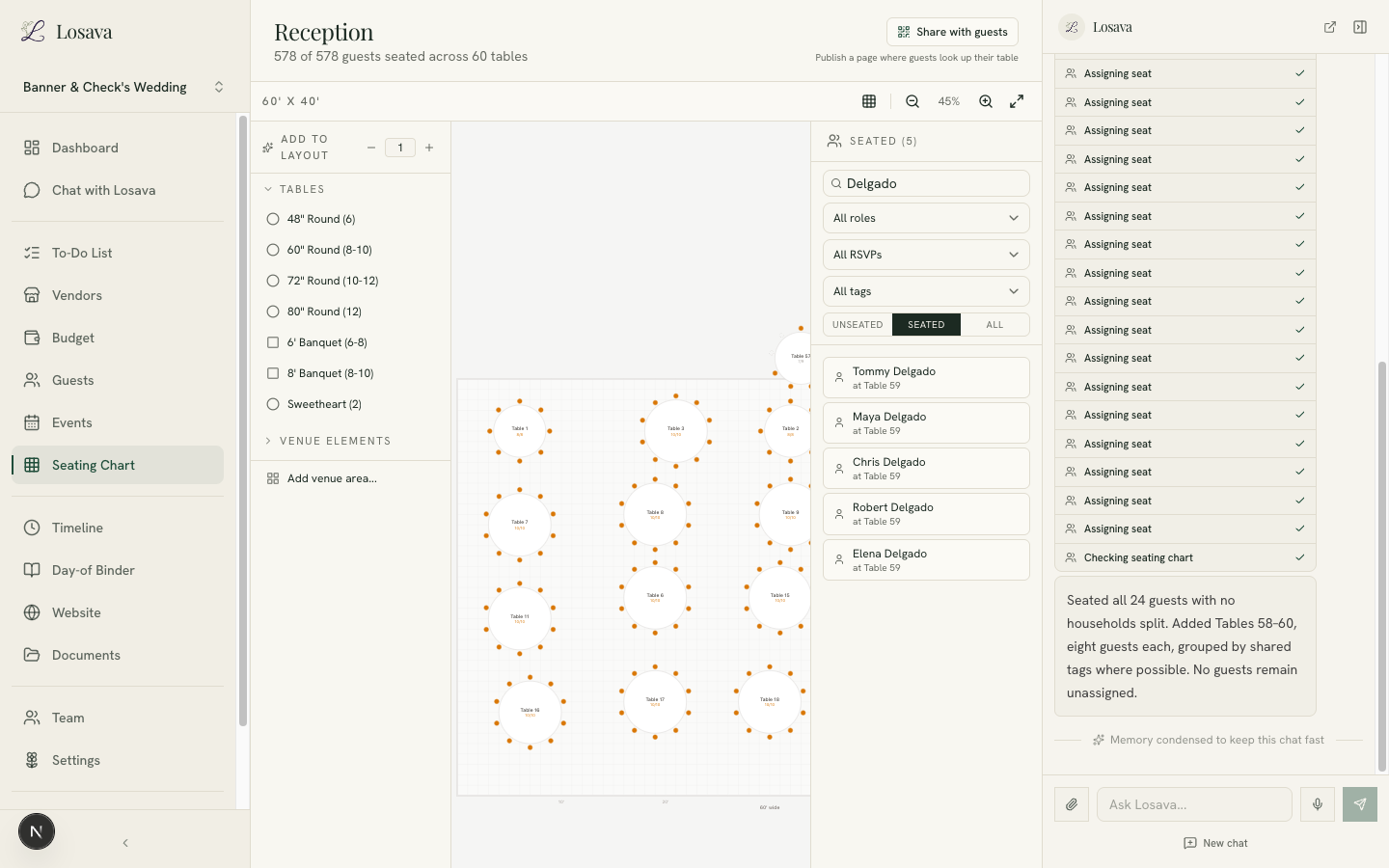
All five at Table 59, together. The couple stayed paired, the grandparents landed at the same table, and the child sat with his parents. If anything had looked wrong, fixing it is a drag on the canvas or one more sentence to the assistant: "Move the Delgados closer to the dance floor."
That's the right division of labor. The AI does the placement math; you do the judgment calls it can't make, like which college roommates have unresolved history.
The Chart Stays Alive Until the Wedding
Because the seating chart reads directly from your guest list, the two never drift apart:
- An RSVP changes, the chart knows. Declines free their seats; the unassigned panel catches late additions. You re-run the same one-sentence request whenever stragglers accumulate.
- Tags follow guests to their tables. Shuttle Needed, Out of Town, kids: the groupings you built for logistics are the same ones the assistant seats by.
- Guests can look up their own table. One click publishes a seating lookup page on your Losava wedding website, so the question every guest asks on arrival answers itself.
And on the day, the chart feeds your day-of tools: your caterer's counts, your coordinator's table map, and the final headcount all come from the same source.
What This Looks Like for Your Wedding
The honest version of the workflow:
- Set up the floor plan once with your venue's real dimensions and table inventory. Fifteen minutes with the venue's spec sheet.
- Seat your VIP tables yourself. Parents, wedding party, the tables where judgment matters. This is the fun part anyway.
- Give the AI the rest, with your constraints. Households, couples, tag affinity, whatever rules describe your people. One sentence is usually enough.
- Re-run as RSVPs move. The puzzle stops being a dreaded project and becomes a sentence you type whenever the unassigned count creeps up.
- Publish the lookup page in the final week and stop fielding "which table am I?" texts.
For the human strategy underneath, who sits at table one, how to handle divorced parents, whether you need a kids' table, our stress-free seating chart guide covers the etiquette side.
Losava is the AI wedding planner where your seating chart, guest list, and RSVPs live in one place. Lay out your real venue, state your constraints in plain English, and let the assistant handle the placement math. Start planning with Losava for free.